Now in beta — v0.2.0
Map your thinking.
Supercharge it with AI.
Idekya is a local-first mind map editor with built-in AI assistance. Your maps stay on your machine. Your ideas grow faster.
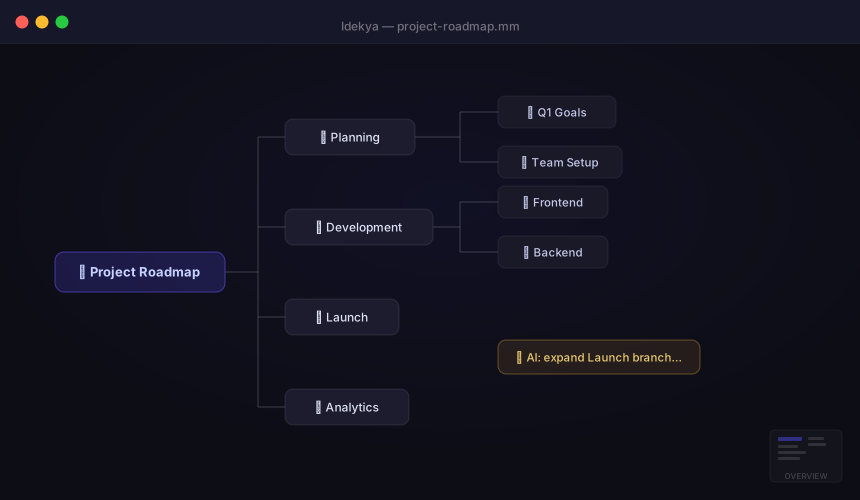
Idekya is a local-first mind map editor with built-in AI assistance. Your maps stay on your machine. Your ideas grow faster.
Features
From quick brainstorms to deep knowledge structures — with AI always a keystroke away.
Chat with an AI that can see your entire map. Ask it to generate branches, rename nodes, reorganize ideas — changes apply directly with Undo as your safety net.
Select any node and let AI suggest children, expand a branch, or rewrite content. Works at the node level so you stay in control of the structure.
Your maps are plain .mm files on your disk. No account, no cloud sync, no subscription. Open them with FreeMind or any compatible tool.
Full read/write compatibility with FreeMind .mm format. Import your existing maps, export to share with anyone — zero lock-in.
Tab to add children, Enter for siblings, Del to remove, Ctrl+Z to undo. Navigate, expand, and collapse your entire map without touching the mouse.
Attach URLs to any node. Drag a link from your browser directly onto the canvas. AI can even suggest links and validate YouTube or web URLs automatically.
Clip any article, page, or selected text straight from Chrome into an open map — without switching windows. One click and it's a node.
Open today's capture map instantly with Ctrl+T. Set your priorities in the morning, log wins and blockers during the day — one dedicated map per day.
Who it's for
Whether you're planning a project or building a knowledge base, Idekya gives your thinking room to grow.
Plan system architectures, map out features, and brainstorm technical approaches — with AI that understands context.
Organize lecture notes, build concept maps for study, and let AI help expand what you know about a topic.
Outline articles, plan video scripts, and explore story structures before you write a single word.
Map out roadmaps, feature hierarchies, and stakeholder requirements in a format that's easy to share and update.
Create visual learning materials, map curriculum, and build frameworks for workshops or courses.
Capture and connect ideas across projects. Use AI to surface relationships and fill in gaps you hadn't thought of.
Download
No account required. Your data stays on your machine.
By downloading you agree to our Terms of Use.
Clip any article or selected text directly into an open Idekya map — one click, no copy-paste.
Downloads/idekya-extension/
chrome://extensions
idekya-extension/ folder
Pricing
Start free. Upgrade when AI becomes essential to your workflow.
Try all features. AI assistant included — perfect for daily exploration.
or $69/year — save 28%
Unlimited AI. No API key needed.
All plans include local-first storage. Your maps never leave your machine.
Contact
We read every message. Usually reply within 24 h.